Close Menu
Knickpoint Media
  • Breaking News
  • World News
  • Politics
  • Sports News
  • Business
  • Health
  • Kenya News
  • Education
  • Technology
  • Agriculture
  • Our Culture
  • Real Estate
  • Jobs & Career
  • Lifestyle
  • Entertainment
  • Creative Tips
  • Opinions
  • Environment
  • 18 & Above
  • Travel Insights
  • Human Rights
  • Crime & Security
  • Science & Research
  • The Youths & Tips
  • Religion & Spirituality
  • Finance & Money Tips
Facebook X (Twitter) Instagram
KNICKPOINT
  • About
  • Contact
  • Standards
  • Partner
  • Support
  • Advertise
  • Submit
Facebook X (Twitter) Instagram
Subscribe
  • Kenya
  • News
  • Politics
  • The World
  • Opinions
  • Youths
  • Culture
  • Travel
  • Agriculture
  • Editor’s choice
  • Health
  • Business
  • MORE
    • Creative Tips
    • Money Tips
    • Crime & Security
    • Jobs & Career
    • Human Rights
    • Environment
KNICKPOINT
  • Advertise
  • Support
  • Partner
  • Contact
  • Tracker
  • Submit
  • Standards
  • About
  • Terms
Home • Creative Tips • Step-by-Step Guide: Verifying Vehicle Registration and Driver’s License Using Kenya’s NTSA App
Creative Tips

Step-by-Step Guide: Verifying Vehicle Registration and Driver’s License Using Kenya’s NTSA App

Knickpoint MediaBy Knickpoint MediaApril 20, 2025No Comments3 Mins Read
Share Facebook Twitter Pinterest Copy Link Telegram LinkedIn Tumblr Email WhatsApp
Follow Us
Facebook X (Twitter) Instagram YouTube WhatsApp TikTok RSS
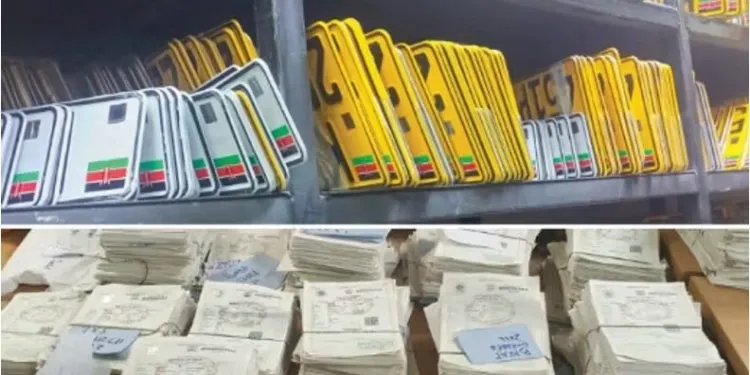
Number Plate Registration
Share
Facebook Twitter LinkedIn Pinterest Email Reddit Telegram WhatsApp Copy Link

​Ensuring the authenticity of vehicle registration and driver’s licenses in Kenya is crucial for compliance with traffic laws and enhancing road safety. The National Transport and Safety Authority (NTSA) offers a user-friendly mobile application that allows individuals to verify car number plates and driver’s licenses for free. This guide provides a step-by-step process on how to utilize the NTSA app for these verifications.​

Downloading and Setting Up the NTSA App

  1. Download the NTSA App:
    • For Android users, access the Google Play Store and search for “NTSA.”​
    • For iOS users, visit the Apple App Store and search for “NTSA.”​Kenyans+5Android Apps on Google Play+5ntsa.go.ke+5
    • Download and install the app developed by the National Transport and Safety Authority.​
  2. Register or Log In:
    • Upon opening the app, you’ll be prompted to log in or create an account.​
    • If you’re a new user, register by providing your personal details as prompted.​
    • Existing users can log in using their credentials.​

Verifying Vehicle Registration Details

  1. Access Vehicle Verification:
    • After logging in, navigate to the “Vehicle Information” or “PSV Verification” section within the app.​Kenya News Trends
  2. Enter Vehicle Registration Number:
    • Input the vehicle’s registration number (license plate number) into the provided field.​
  3. Retrieve Vehicle Details:
    • Submit the registration number to access comprehensive details about the vehicle, including:​
      • Insurance status.
      • License validity.
      • Inspection details.
      • Ownership information.

Verifying Driver’s License Details

  1. Access Driver Verification:
    • Within the app, select the “Driver Verification” option.​
  2. Enter Driver’s License or ID Number:
    • Input the driver’s license number or national ID number of the individual in question.​Kenya News Trends
  3. Retrieve Driver’s Details:
    • Submit the information to view details such as:​
      • License validity.
      • Driving history.
      • Any existing sanctions or restrictions.
This Is Related  How to Digitally Sign a Word Document: Easy Step-by-Step Guide 2025

Verifying Conductor Details

  1. Access Conductor Verification:
    • Navigate to the “Conductor Verification” section in the app.​Kenya News Trends
  2. Enter Conductor’s ID Number:
    • Provide the national ID number of the conductor.​
  3. Retrieve Conductor’s Details:
    • Submit the ID number to access information regarding:​
      • Registration status.
      • Certification details.

Additional Features and Tips

  • Night Travel Authorization:
    • Use the vehicle registration number to verify if a long-distance Public Service Vehicle (PSV) is authorized for night travel.​Kenya News Trends
  • Sacco or Company Verification:
    • The app allows verification of a vehicle’s Sacco or company affiliation using its body information.​Kenya News Trends
  • Reporting Discrepancies:
    • If any inconsistencies or irregularities are found in the information provided, report them directly to NTSA through the app for prompt action.​Kenya News Trends

By utilizing the NTSA mobile app, individuals can proactively ensure that vehicles, drivers, and conductors comply with Kenyan transportation regulations, thereby contributing to safer roads for everyone.​Kenya News Trends

Number Plate Registration Process in kenya
Follow on Facebook Follow on X (Twitter) Follow on Instagram Follow on YouTube Follow on WhatsApp Follow on Reddit Follow on RSS
Share. Facebook Twitter Pinterest LinkedIn Email Copy Link Telegram WhatsApp
Previous ArticleGrow Your Savings with Cytonn Money Market Fund in 2025
Next Article Understanding Kenya’s Computer Misuse and Cybercrimes Act
Knickpoint Media
  • Website

Knickpoint Media is a dynamic news informer and blogger renowned for his ability to break down complex stories into relatable, thought-provoking narratives. With a passion for delivering authentic and impactful content, he has become a trusted voice in journalism and digital media.

Related Posts

10 Realistic Small Business Ideas to Earn KSh 1,000 Daily in Kenya

November 2, 2025

The Willpower Trap: Why Self-Control Fails and Systems Succeed

October 2, 2025

DJ Racey 254 Biography – From DJ Academy to ETA Best DJ of the Year 2025

September 6, 2025

How to Tie a Tie: Master 4 Classic Knots for Any Occasion

June 27, 2025

The Perfect Chocolate Cake: A Masterclass in Timeless Baking

June 26, 2025
Leave A Reply Cancel Reply

FOLLOW US
  • Facebook
  • Twitter
  • YouTube
  • WhatsApp
  • TikTok
  • Threads
  • YOU MIGHT LIKE THIS TODAY

Humanity Calls International Grant Program Review: Reported Concerns, Red Flags, and a Public Warning

Kenya Online Court Services: eFiling, ePayment, Case Tracking & Judgments Guide

GHRIS Kenya: Complete Guide to Payslips, Leave & KRA P9 Forms for Public Servants

Isiolo Eco Alliance – Community-Led Environmental Conservation in Kenya

KNICKPOINT MEDIA LATEST

Humanity Calls International Grant Program Review: Reported Concerns, Red Flags, and a Public Warning

How to Start a Business in Kenya with 20k: Top 10 Profitable Ideas

Banking Secrets: How Your Bank Profits & How You Can Too

Hidden Money Rules for Wealth in Kenya | 7 Untold Financial Secrets

OUR CATEGORIES
  • Agriculture
  • Breaking News
  • Business
  • Creative Tips
  • Crime & Security
  • Editor’s choice
  • Education
  • Entertainment
  • Environment
  • Finance & Money Tips
  • Health
  • Human Rights
  • Jobs & Career
  • Kenya News
  • Lifestyle
  • Opinions
  • Our Culture
  • Politics
  • Real Estate
  • Religion & Spirituality
  • Science & Research
  • Sports News
  • Technology
  • The Youths & Tips
  • Travel Insights
  • World News
Knickpoint Media
Facebook X (Twitter) Pinterest Vimeo WhatsApp TikTok Instagram

OUR MAJORS IN NEWS

  • World
  • Politics
  • Culture
  • Business
  • Opinions
  • Technology
  • Science

Company

  • About Knickpoint Media
  • Advertising With Us
  • Our Starndards
  • Our Contacts
  • Our Terms and Conditions
  • Our Privacy Policy
  • Partner With Us
  • Support Our Work

Services

  • Guest Articles
  • Website Maintainance
  • Web Development
  • Art & Authorship
  • Sponsored Articles
  • Work With Us
  • Web Hosting
  • Domain Registration

Subscribe to Updates

Get the latest creative news from FooBar about art, design and business.

© 2026 Knickpoint Media. Designed by Editoria Cloud Systems.
  • Privacy Policy
  • Terms
  • Accessibility

Type above and press Enter to search. Press Esc to cancel.

Accessibility Adjustments

Powered by OneTap

Accessibility Commitment for Knickpoint Media

At Knickpoint Media, we are committed to making our digital presence as accessible and inclusive as reasonably possible for all users, including individuals with disabilities. Our goal is to improve the usability of https://knickpointmedia.co.ke and to support a more accessible experience for everyone, regardless of their abilities or the technologies they use.

Our Approach to Accessibility

We aim to align with the Web Content Accessibility Guidelines (WCAG), which define internationally recognized standards for digital accessibility. While full compliance cannot always be guaranteed, we strive to implement improvements where feasible and regularly review accessibility-related aspects of our website. Accessibility is an ongoing process, and we are committed to improving the experience over time as technologies, standards, and user needs evolve.

Accessibility Features

To support accessibility, https://knickpointmedia.co.ke may utilize tools such as the OneTap accessibility toolbar. This interface provides users with a range of helpful features, including:
  • Adjustable text size and contrast settings
  • Highlighting of links and text for better visibility
  • Full keyboard navigation of the toolbar interface
  • Quick launch via keyboard shortcut: Alt + . (Windows) or ⌘ + . (Mac)
Please note the following:
  • The availability and effectiveness of these features depend on the website's configuration and ongoing maintenance.
  • While we strive to ensure accessibility, we cannot guarantee that every part of https://knickpointmedia.co.ke will be fully accessible at all times. Some content may be provided by third parties or affected by technical constraints beyond our immediate control.

Feedback and Contact

We welcome your feedback. If you experience any accessibility barriers or have suggestions for improvement, please contact us: Email: info@knickpointmedia.co.ke We are committed to reviewing all inquiries and aim to respond within 3–5 business days. If you require assistance accessing any part of this website, we are happy to provide support through alternative channels upon request. Last updated: March 29, 2026
How long do you want to hide the toolbar?
Hide Toolbar Duration
Select your accessibility profile
Vision Impaired Mode
Enhances website's visuals
Seizure Safe Profile
Clear flashes & reduces color
ADHD Friendly Mode
Focused browsing, distraction-free
Blindness Mode
Reduces distractions, improves focus
Epilepsy Safe Mode
Dims colors and stops blinking
Content Modules
Font Size

Default

Line Height

Default

Color Modules
Orientation Modules
Ad Blocker Enabled!
Ad Blocker Enabled!
Aii, sawa sawa bro! Hii site inapata Mukuchu Ya Maintainance through adds manze, So, Kama Unataka Kusupport Knickpoint Media Manze, Disable Hiyo ad blocker. Just straight love! 😄